Notifications
Clear all
MODX/MODX+/MODX M
18
Posts
3
Users
1
Reactions
1,598
Views

Topic starter
Please clarify what 'button' you are referring to.
There was no quote before that question for context, but I assume you're referring to the first paragraph of the post you were responding to, where I said "(previous gen didn't have an Octave button on the Performance screen)" -- I am referring back to the particular onscreen button that I have been talking about through the entire conversation, the Part-level Oct button on the Performance screen (and in my examples, specifically the one for Part 2).
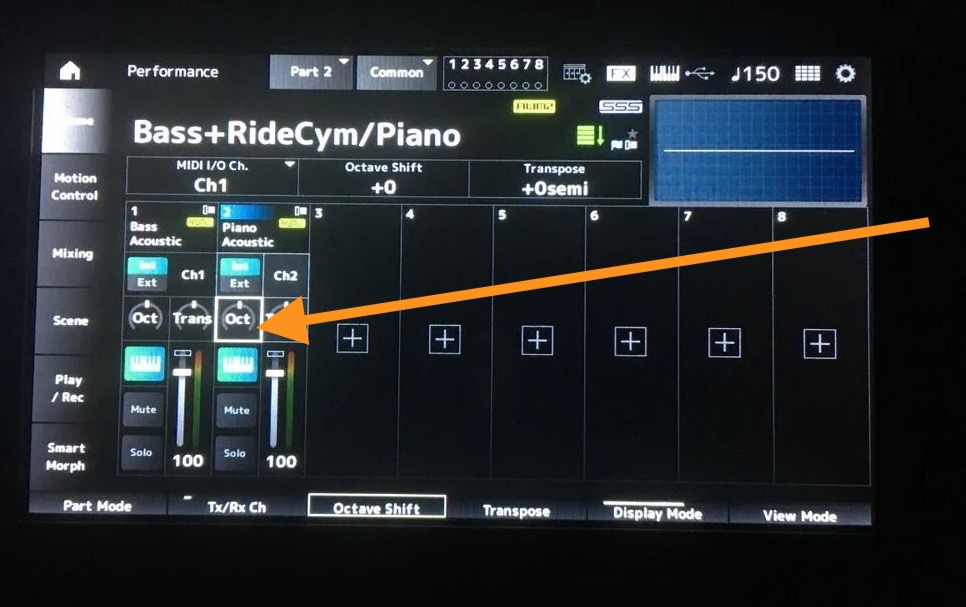
The behavior of this button has been the entire focus of my issue (and, to clear up your subsequent comments also about not knowing which button I was referring to, this is the only Performance screen Octave button I have ever referred to). (And since this button did not exist prior to the M series, it is a relatively new concern.)
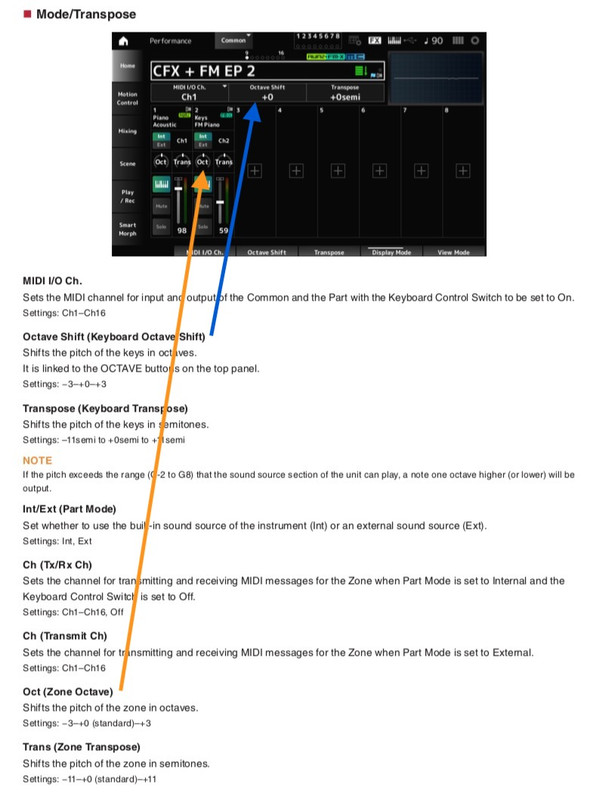
That graphic appears to be the one from p.78 of the Modx M op manual. The Montage M manual has an equivalent on p. 120 and I can only comment on that one. I would expect the Modx M to be the same but have no way of knowing.For the Montage M (p. 120) the text in the graphic 'Octave Shift (Keyboard Octave Shift)' and 'Transpose (Keyboard Transpose)' refer to the Utility screen settings - not the part settings.
Indeed, I referred to the wrong text there, thanks for pointing that out. I can't comment about how this relates to Utility screen settings you mention (I didn't check, and it has no relevance to my issue), but the text I quoted referred to the upper "Octave Shift" button on the Performance screen (blue arrow in image below), rather than the Part-level "Oct" button on that same Performance screen (orange arrow). So yeah, that negates my point about the manual referring to the function in question seemingly being equivalent to the front panel Transpose function, and we're back to Yamaha's true intent of the part-level button being ambiguous.
And in fact, there is more confusion here because they refer to this orange-arrow button not as "Part Octave" but rather as "Zone Octave," and in Yamaha-speak, a Zone is always external (whereas it is possible for Parts to house either internal or external sounds). So as someone familiar with Yamaha-speak, if I were to read this manual and not have the actual keyboard, I'd figure that this button could have no function at all on an internal sound. Since it does affect internal sounds, I'm surprised that they don't call this "Part Octave." It kind of makes me think that even some people at Yamaha are confused about how these things are supposed to function. 😉
And those 'Oct' and 'Trans' settings on the home screen will be found on the parts 'Zone Settings' screen and NOT on the parts 'Pitch' screen. And on the M8X those home screen settings for an internal part (which are found on the zone settings screen) do NOT show up on the new scene 'Note Limit' screen.
Just as a side note, this kind of inconsistency is kind of like the last section of my OP, not directly related to the rest of what we've been talking about. It sounds kind of similar to the confusion that can arise from the fact that Split settings made on the new dedicated Split screen show up on the Performance Home screen, but Split settings made on the Performance Home screen do not show up on the dedicated Split screen.
It's also kind of interesting that they have that note about how it substitutes notes if you call for a sound that is out of range. It seems they specifically want to avoid unintentionally silent keys!the note is saying that if the settings would result in a 'pitch' that is out of range it will use a 'pitch' that is an octave higher or lower. It has nothing to do with avoiding 'silent keys' at all
I believe it *does* show that they are concerned with avoiding silent keys. I think they are saying is that, if your settings result in a situation where hitting some key would call for a pitch that was out of range, rather than giving you silence on that key, it would substitute a pitch from a different octave, in order to avoid the silent key phenomenon. No?
The 'Oct' and 'Trans' shown for each part might also be called 'buttons' so that is why it isn't clear which of the two sets you refer to. I have tried to keep mentioning BOTH sets to help avoid that confusion but may not have been successful in that.
Yeah, I have always only been talking only about the ones at the Part level. If you were ever referring to the ones at the top part of that same screen, sorry, I missed that shift.
Getting back to something you said earlier:
By definition - transpose alters the MIDI number that is generated. Since your example is NOT altering the midi number then, again by definition, it can NOT be a transpose.
I'm wondering if we can be certain that the operation of hitting the part's Oct button is *not* shifting the MIDI number. You say this can be confirmed by looking at the MIDI Output. I'm wondering if it's possible that maybe in the current architecture, when playing an internal sound only, the "transposed" MIDI exists but is not sent to the MIDI Out jacks, though the MIDI note is still being shifted as far as the internal sound engine is concerned. That is, maybe your expected MIDI shift IS happening, we just can't see it where you're looking for it. Because that would also explain the Transpose-like result of this button's ability to result in altering which keys are playing (or not playing) a given sound, something that we know happens with Transpose but is not a characteristic of Note Shift.
Posted : 24/11/2025 5:58 pm

Yes - confusion reigns (rains?) supreme!
And in fact, there is more confusion here because they refer to this orange-arrow button not as "Part Octave" but rather as "Zone Octave," and in Yamaha-speak, a Zone is always external (whereas it is possible for Parts to house either internal or external sounds). So as someone familiar with Yamaha-speak, if I were to read this manual and not have the actual keyboard, I'd figure that this button could have no function at all on an internal sound.
At least those 'Zone' references are actually correct for both internal and external. Except, as you say, why are zone settings being used at all for internal parts?
That is a big part of the 'mess' I referred to. Looking at that value would suggest it tells you what sound to expect. Except for internal parts the value on the pitch screen, if any, is added to it. So what you see isn't necessarily what you get.
Since it does affect internal sounds, I'm surprised that they don't call this "Part Octave." It kind of makes me think that even some people at Yamaha are confused about how these things are supposed to function.
Almost like different dev teams worked on different parts of it.
I can't comment about how this relates to Utility screen settings you mention (I didn't check, and it has no relevance to my issue)
Sorry about that. We realize, of course, the upper settings aren't related to your issue but we wanted to cover ALL the bases since they are related to the bigger question of 'which buttons do what' in terms of transpose and note shift. Especially because that 'Trans' label on the home screen is really a 'note shift' for an internal part but a 'transpose' for an external part.
Just as a side note, this kind of inconsistency is kind of like the last section of my OP, not directly related to the rest of what we've been talking about.
True - just included to try to cover the other places where the transpose/shift params appear and are inconsistent.
I'm wondering if we can be certain that the operation of hitting the part's Oct button is *not* shifting the MIDI number.
That's a good point worth highlighting. There is no way we know of to know/determine what is happening internally. We can only deduce from the external manifestations. So with no external parts an internal part DOES have its MIDI sent out so a midi monitor can see it. And for that case the midi notes are NOT shifted using the part-level home screen buttons you have been referring to or using the Zone Settings screen params (which are one and the same).
Although it seems unlikely it would alter the MIDI note internally but then send it out unaltered we don't think you can ever be certain about those internal things. Internal code paths are likely to be different for different settings and it can be incredibly easy to update one path and forget to take other paths into account to make them consistent.
As long-term developers it is eerily similar to the 'backward compatibility' hell that results in boxing yourself into a corner with updates when you are afraid to break what has gone before. You keep making incremental patches ON previous patches and at some point the whole thing starts falling apart.
Not your issue, we know, but we think that is the state of things. Any change they make in this area almost certainly means that certain 'saved' performances will suddenly work differently in a new OS update. Only our opinion but we think this area is beyond the point where you can just solve it by offering the user a 'switch' to choose which behaviour they want.
Any such 'cure' is likely to be worse than the current 'disease'. They really need to rearchitect the entire core of the internal/external tranpose/note shift functionality.
Did using the 'Note Shift' setting on the part pitch screen give you what you want?
Posted : 24/11/2025 8:13 pm
Topic starter
Did using the 'Note Shift' setting on the part pitch screen give you what you want?
I don't have access to the MODX M, but it functions as desired on my MODX, and based on what you said earlier, I think it also functions that way on your Montage M (your having also confirmed that the Oct button on Part 2 of a Performance on the Montage M gives you the same undesirable result I got on the MODX M, i.e. where you said "M8X - silence").
Posted : 25/11/2025 2:11 am
Page 2 / 2
Prev